Upgrading Your Plan
Learn how to upgrade from the Free plan to unlock more monthly practice time and full course access.
Upgrading Your Plan
Lugalink offers flexible pricing plans to suit your language learning needs. This guide will walk you through the process of upgrading from the Free plan to a paid subscription.
Available Plans
Every plan includes a monthly allowance of AI coaching time. Paid plans give you more practice time, full course access, and the ability to top up if you run out.
- Free — $0/month. 30 minutes of coaching per month, plus a one-time 60-minute welcome bonus in your first week. No credit card required — perfect for trying out the platform.
- Starter — $9.99/month. 3 hours of coaching per month and full course access. Includes a 7-day free trial.
- Plus (Recommended) — $19.99/month (a $14.99 founding rate for early members), or $143.90/year. 6 hours of coaching per month. Includes a 7-day free trial.
- Pro — $39.99/month, or $383.90/year. 14 hours of coaching per month — built for serious daily practice. Includes a 7-day free trial.
All paid plans include:
- ✓ Full access to all courses
- ✓ Every supported language and dialect
- ✓ Progress tracking and analytics
- ✓ The option to buy a top-up pack when you need more minutes
[!NOTE] Annual billing (Plus and Pro) is offered at roughly 20% off the monthly rate. Coaching time is measured in spoken conversation minutes and resets at the start of each billing period. See Usage & Minutes for how the allowance works.
[!TIP] Already subscribed to the legacy Early Bird plan? You keep it — it stays active on your account. Early Bird is no longer offered to new subscribers.
How to Upgrade
There are two main ways to upgrade your plan:
Option 1: From the Homepage
If you're browsing the website, you can upgrade directly from the pricing section:
- Navigate to the Pricing Section
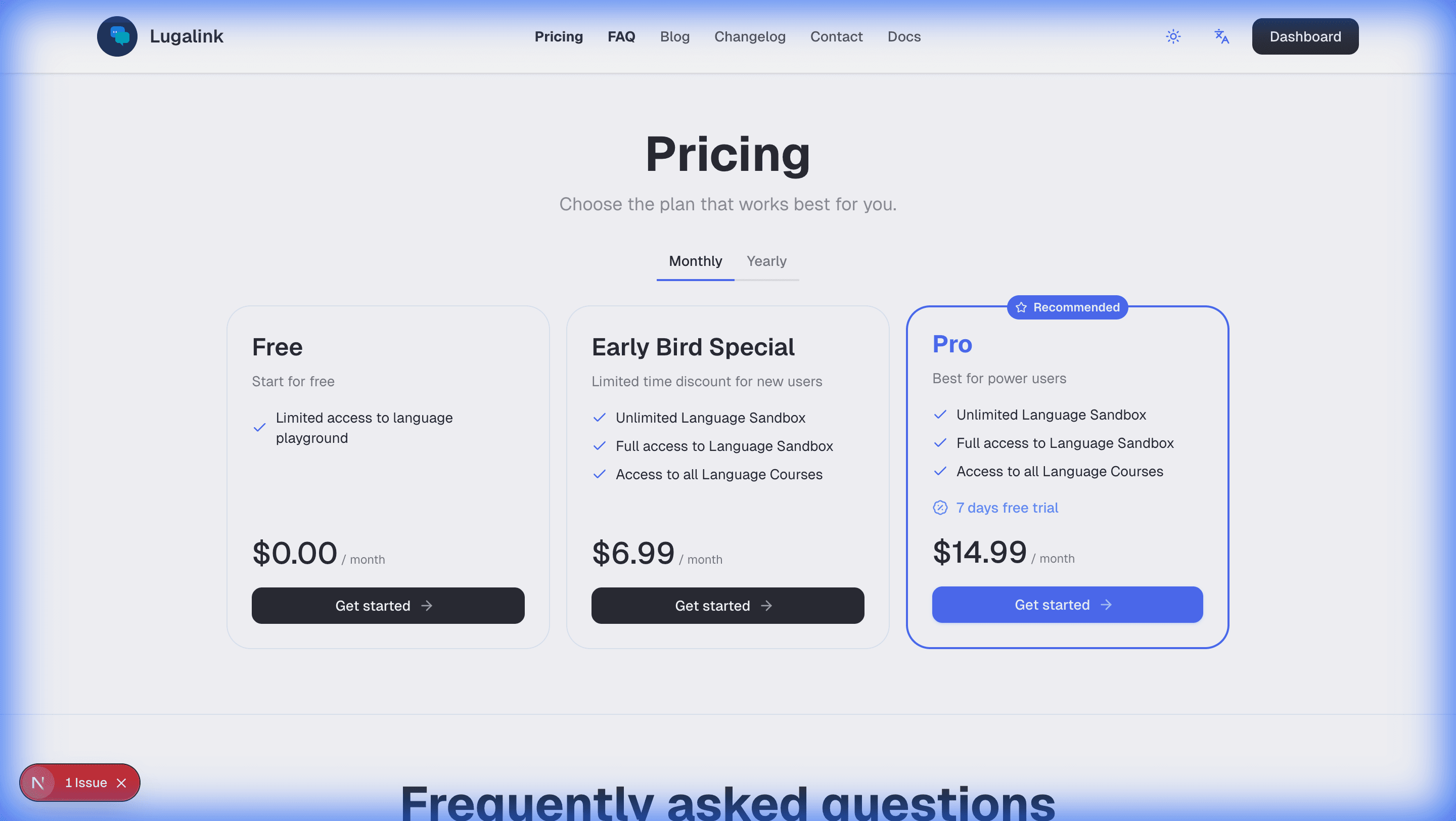
Scroll down to the "Pricing" section on the homepage, or click the "Pricing" link in the navigation menu.
-
Choose Your Plan
Review the available plans and click the "Get started" button on your preferred plan. -
Complete Checkout
You'll be redirected to a secure checkout page where you can:- Enter your payment information
- Review your subscription details
- Complete the purchase
Option 2: From Account Settings (Recommended)
The easiest way to upgrade if you're already logged in:
-
Navigate to Settings
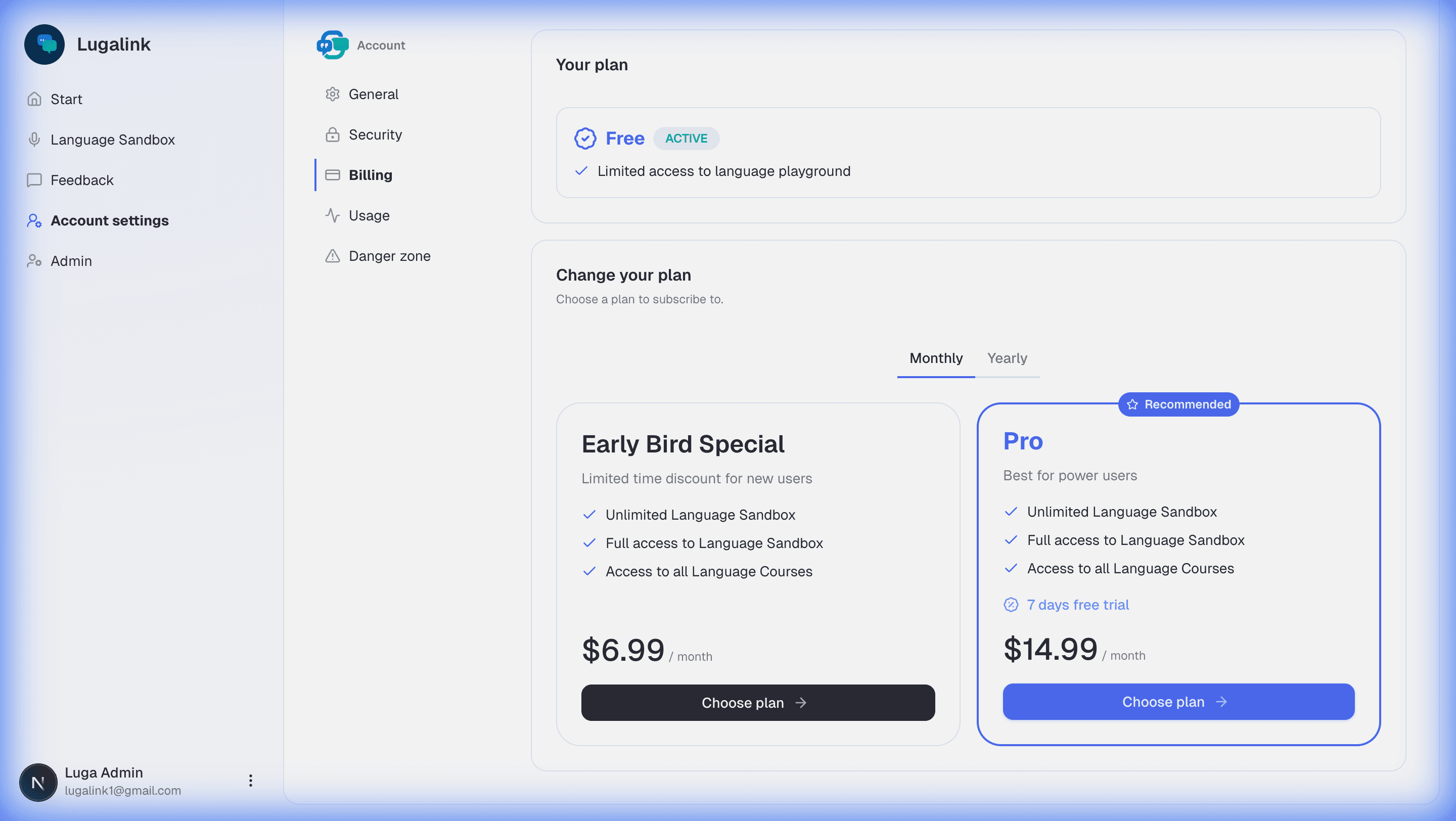
Click on your profile icon or menu, then select "Account settings". -
Go to Billing
In the settings sidebar, click on the "Billing" tab. -
Review Your Current Plan
You'll see your current plan status (e.g., "Free") at the top of the page.
-
Select Your New Plan
- Browse the available upgrade options
- Toggle between Monthly and Yearly billing if available
- Click "Choose plan" on your preferred option
-
Complete the Checkout Process
You'll be redirected to a secure payment gateway where you can:- Enter your payment details
- Review the subscription terms
- Confirm your upgrade
-
Confirmation
Once payment is processed, you'll receive:- An email confirmation of your subscription
- Immediate access to all premium features
- Your billing settings will update to show your new active plan
Billing Frequency
You can choose between:
- Monthly: Billed every month, cancel anytime
- Yearly (Plus and Pro): Billed annually at roughly 20% off the monthly rate
You can switch between monthly and yearly billing by viewing the different plan options on the billing page.
Free Trial
Every paid plan — Starter, Plus, and Pro — includes a 7-day free trial. During the trial period:
- You have full access to that plan's features and monthly coaching allowance
- You won't be charged until the trial ends
- You can cancel anytime during the trial with no charge
Running Low? Buy a Top-Up
Need more practice time before your next billing period? Any plan — including Free — can buy a one-time top-up pack of 150 extra minutes (2.5 hours) for $9, without changing your subscription.
- In the app, open App → Usage.
- Click Buy minutes.
- Complete checkout.
Top-up minutes are used after your monthly allowance runs out and never expire — they carry over from one billing period to the next until you spend them.
Managing Your Subscription
After upgrading, you can manage your subscription from the Settings → Billing page:
- View your current plan and billing status
- Update payment methods
- Change your plan (upgrade or downgrade)
- View billing history
- Cancel your subscription (if needed)
Need Help?
If you encounter any issues during the upgrade process:
- Check that your payment information is correct
- Ensure you have a stable internet connection
- Try using a different browser or device
- Contact our support team through the Contact Us page
Frequently Asked Questions
Q: Can I cancel my subscription at any time?
A: Yes, you can cancel your subscription at any time from your billing settings. You'll retain access until the end of your current billing period.
Q: Will I be charged immediately?
A: No. Every paid plan (Starter, Plus, and Pro) starts with a 7-day free trial, so you won't be charged until the trial ends. You can cancel any time before then at no cost.
Q: What happens if I use up my monthly minutes?
A: Practice pauses until your allowance resets at the start of your next billing period. If you need more time sooner, you can buy a top-up pack of extra minutes, or upgrade to a higher plan.
Q: Can I upgrade or downgrade later?
A: Yes, you can change your plan at any time from your billing settings. Changes will take effect at the start of your next billing cycle.
Q: What payment methods do you accept?
A: We accept all major credit cards and other payment methods supported by our secure payment processor.
Q: Is my payment information secure?
A: Yes, all payments are processed through a secure, PCI-compliant payment gateway. We never store your full payment details on our servers.